- 索沛CS1.6论坛 CS反作弊 CS1.6下载 amxx sma插件 cs对战平台 (http://sorpack.com/index.asp)
-- Moon.Lords (http://sorpack.com/list.asp?boardid=60)
---- Picture Profile, Medals and Personal Information through Member's Post (http://sorpack.com/dispbbs.asp?boardid=60&id=1140598)
-- 发布时间:2012-03-01 17:55:00
-- Picture Profile, Medals and Personal Information through Member's Post
Picture Profile, Medals and Personal Information through Member\'s Post
Introduction
When a member makes a new post or reply a post there are many information that can tell us about that member through his profile. The member\'s information is divided into two categories: 1. His picture profile and 2. His overall achievement in gaming, forum, personal information and conviction. For example my picture profile in figure 1.1.
First Information catagory
Picture Profile will show you of member forum level, Cable currency, number of post, date of registered and member\'s medal achievement. The colour of the members name tag will tell you on whether he is a moderator or not. Green name tag is for ordinary members or non moderator whereas Red name tag is a forum Moderator.
 此主题相关图片如下: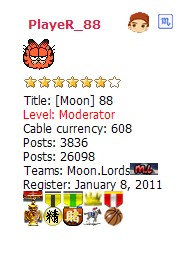
Figure 1.1:
PlayeR_88 picture profile
By placing your mouse pointer on top of a medal like in Figure 1.2, information of the medal will appear on screen instantly. For example if you place
your mouse pointer on top of a Sponsoring medal, a text will appear \'supporting member\' and on an essence medal it will show you how many essence you have. Whereas for gambling medals like Tiger Slot machine, Horse race and Football lottery, it will show you how much sb that you have won so far. Now you could compare your winning with other members of Sorpack. A Captain or a Vice Captain medal text will appear as “Team Duties” Vice Captain or Captain like in Figure 1.3.
Nevertheless, if you have an Irrigation Medal  , it will state on how many deleted post you have. (The text will appear in Chinese Character by default. Therefore, you need to use Google Chrome to translate the page)
此主题相关图片如下: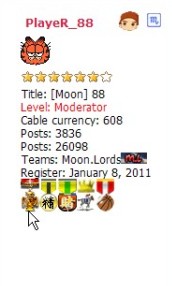
Figure 1.2:
Mouse pointer position for medal information.


Figure 1.3: Shows a Captain and Vice Captain medal
For more information on the new upgraded Gambling medal\'s colour:
http://www.sorpack.com/dispbbs.asp?boardID=40&ID=1139281&page=1
Second Information category
The second information category will be the panel above my post like in Fig.1.4, that is member\'s overall achievement in gaming, forum personal information and conviction.
此主题相关图片如下:
Figure 1.4: Overall achievement in gaming, forum, personal information and conviction
 The first icon from your left is \'Sending the member a short message\'. This function is useful if you like to PM (private message) the particular member.
 The second icon is \'Adding him as a friend\'. You could add the member as your friend for easy contact in the future.
 The third icon is to see a member personal data such as Email, Date of birth, Education background, Number of post, Essence post and also deleted
post.
 The fourth icon is \'View member\'s posts\' in Sorpack forum. This include open post and also reply post.
 The fifth icon is \'Sent Email to the person\'. This function is still not active yet but I guess it will be in the future.
 The sixth icon is Gaming profile information. Here it will show the Level, Score, Kills, OP level and the latest login information of that particular member in a particular game. One glance at this profile, you could tell on the member\'s gaming scenarios. Example of a Gaming profile information is in Figure 1.4.
此主题相关图片如下: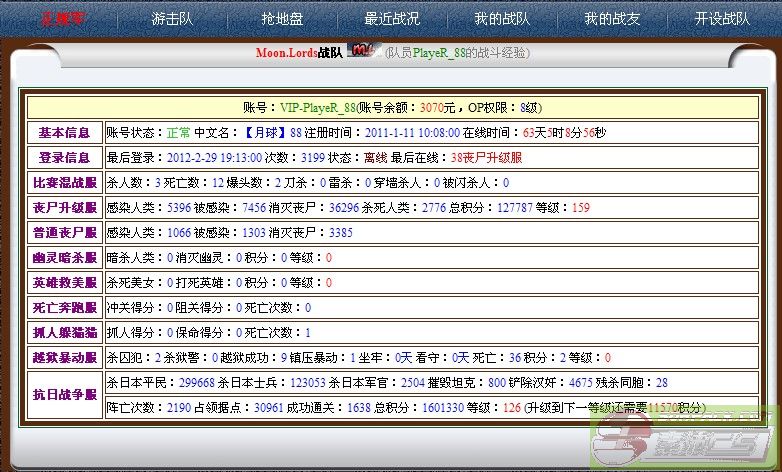
Figure1.4: Gaming profile information
 The last icon is Criminal record. A clean record will show the list is empty and it will state that the member is innocent and has no conviction like in Figure 1.5. Here, you could also query on other members\' criminal record or Demo video by filling in the box, the members name or the name of the Demo video.
此主题相关图片如下: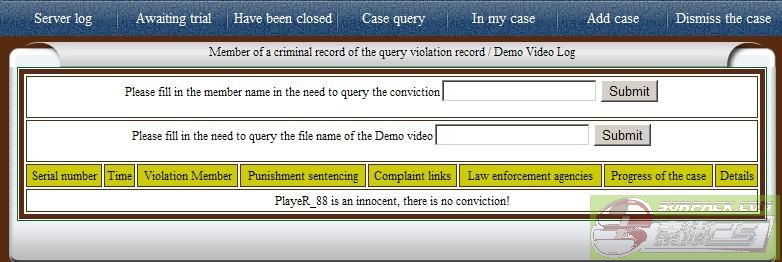
Figure 1.5: Criminal records
Conclusion
I sincerely hope that all members of Sorpack could benefit from this post. As for now on, all other members of Sorpack\'s information are at your click of a mouse, my friend.
-- 发布时间:2012-03-01 17:55:00
--
Reserve for future updates.
-- 发布时间:2012-03-01 17:58:00
--
ricieved

-- 发布时间:2012-03-01 18:00:00
--
Thank you for sharing
-- 发布时间:2012-03-01 18:00:00
--
Support
-- 发布时间:2012-03-01 18:50:00
--
Thank you for sharing
-- 发布时间:2012-03-01 19:11:00
--
Good !!
-- 发布时间:2012-03-01 19:27:00
--


-- 发布时间:2012-03-01 19:30:00
--
Good Smart
-- 发布时间:2012-03-01 19:30:00
--
